Learn How to participate on Shein Free Trial program
Learn how the product testing system works, avoid common application errors, and discover the essential guidelines to properly set up your profile and submit re
Advertisement

WANT TO GET FREE SHEIN PRODUCTS?









DISCOVER HOW THE WORKFLOW OPERATES
Open the Free Trial Center
Start by signing into your profile and heading to the section displaying ongoing trial promotions. On smartphones, the usual path is Profile → More Services → Other Services → Free Trial Center. Once inside, you can browse the merchandise currently open for applicant entries.

Check this hub regularly to see which trial listings are currently accepting entries
Pick your weekly trial options
You are permitted to apply for as many as 3 products within each weekly cycle. Any leftover submission slots expire and do not transfer into the following week. Before locking in your request, double-check your preferred size or style and confirm that your delivery address matches the active store region.
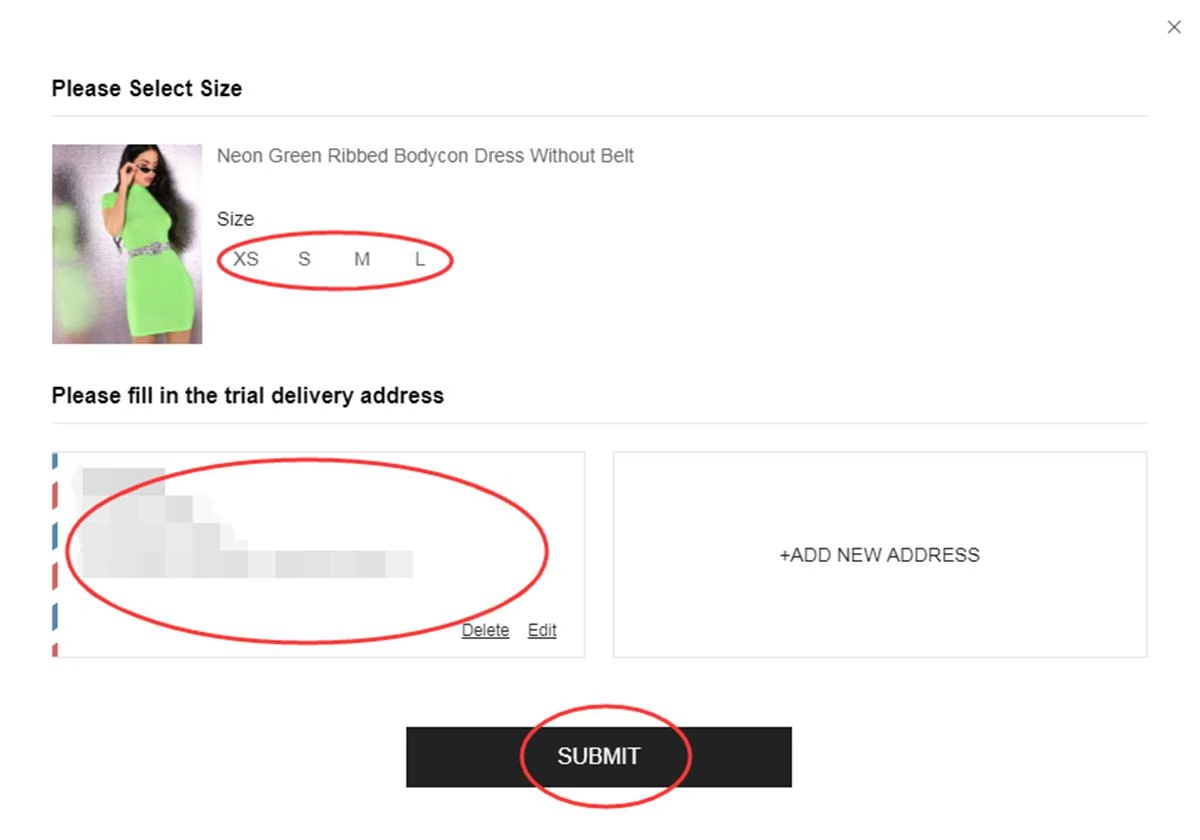
Review the product specifications, sizing, and shipping address thoroughly before confirming
Track your application progress
After sending in your request, visit “My Free Trial” or your activity history to monitor any changes. Status updates generally take roughly seven days to appear. An “Approved” tag means your profile was picked for a chance to test the item, while “Failed” or “Rejected” indicates your entry was passed over for that cycle.
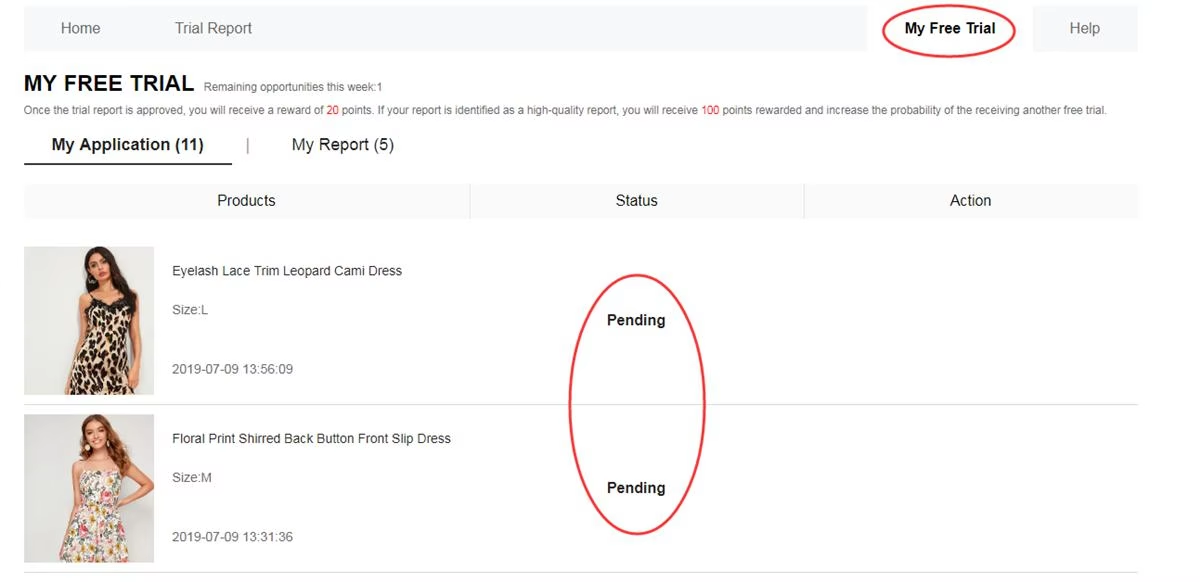
Check your request history to find out which applications were approved
Test the merchandise prior to writing your review
Should your application be chosen, wait until the package is delivered before drafting your assessment. Try out the item directly and evaluate details such as fit, dimensions, fabric, comfort, styling, sturdiness, and overall build quality. Afterward, write an honest review accompanied by crisp photos you captured yourself within the required deadline.
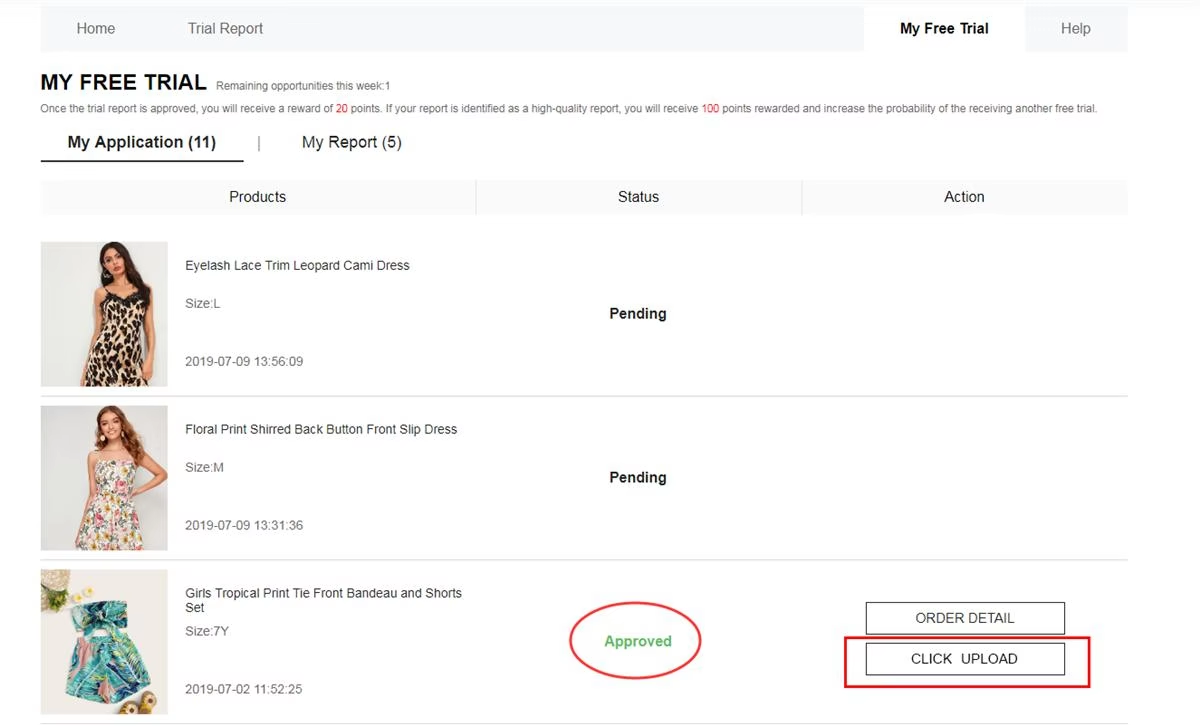
Try the item hands-on first so your feedback reflects genuine everyday use
Check your feedback evaluation
Once your review is published, navigate to My Report to verify its approval state. An approved assessment typically grants 20 points. Entries recognized as a “Quality Report” may earn an extra 100 points. Accumulating points boosts your account engagement, though it does not ensure selection in upcoming trial rounds.
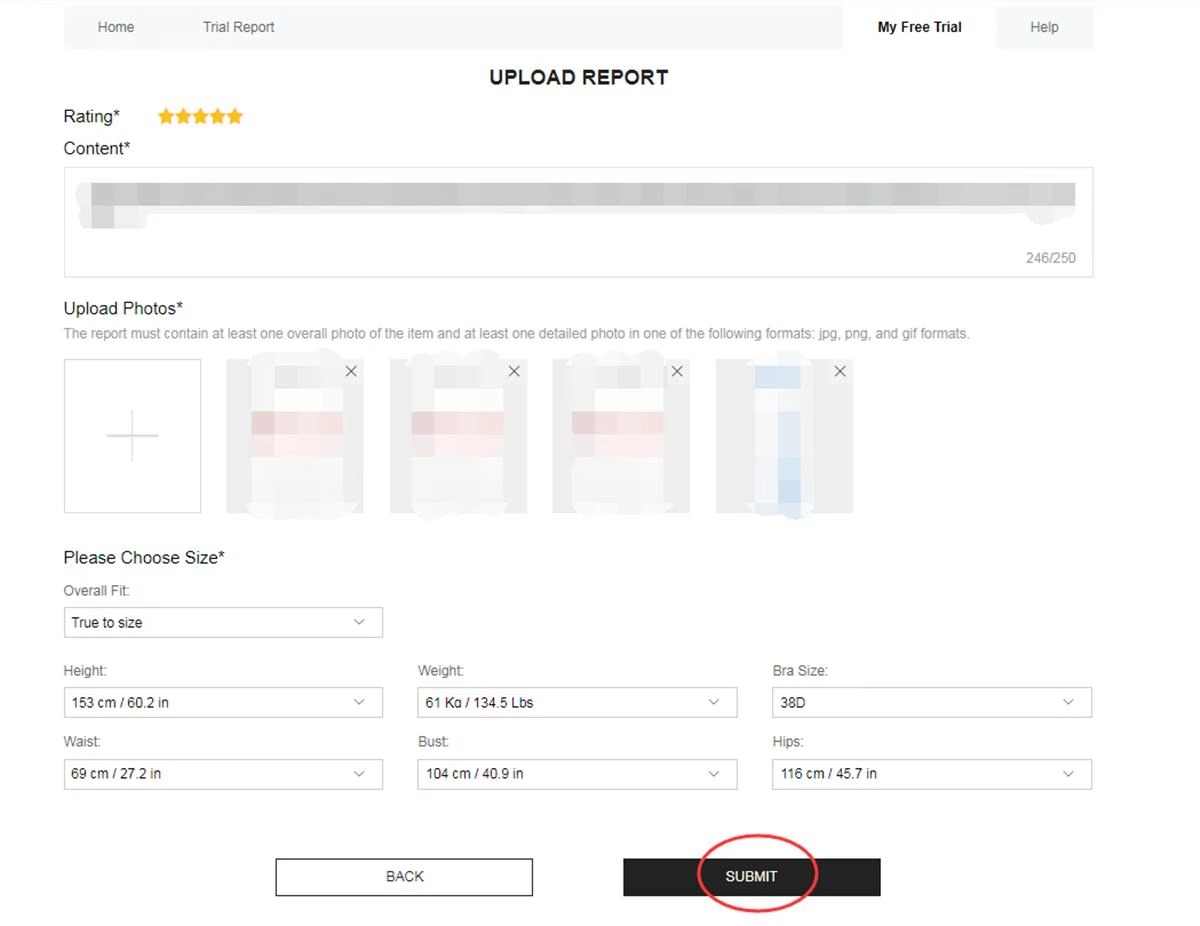
Visit My Report to verify if your assessment passed review and whether extra points were awarded
Revise a report if editing is available
Whenever your submission shows as Rejected, check if the Rewrite button is enabled. If present, this option lets you polish your wording, include overlooked information, and replace out-of-focus pictures before sending your review back for another look.
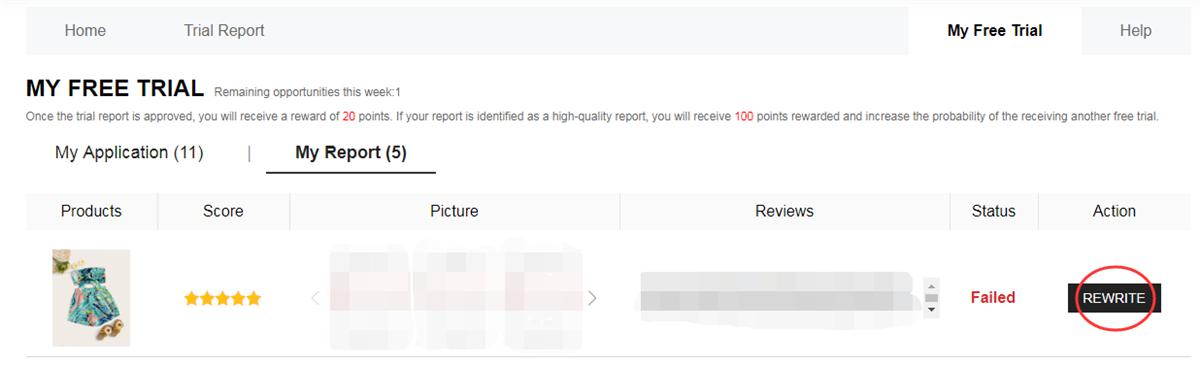
If Rewrite appears, use the chance to improve your assessment before submitting it once more
What occurs once you send in an entry?
The process begins with the merchandise displayed inside the Free Trial Center. Since available listings update on a regular basis, checking the section often helps you catch newly added items as fresh cycles open. Once you pick a product, your submission enters the review stage. At this point, shipment is never guaranteed because your request must first pass selection. If your application gets picked, the order moves into processing and dispatch. After the parcel arrives, try out the item to examine its main features before sharing your final thoughts. The final phase involves submitting your mandatory review within the given timeframe. A detailed write-up paired with authentic photographs gives an accurate impression of how the product performed for you.Which kinds of merchandise can appear in campaigns?
Featured selections shift across different rounds, though trial opportunities frequently span multiple product categories:- Apparel: dresses, blouses, pants, tees, outerwear, activewear, and varied clothing styles.
- Beauty and skincare: makeup, daily skincare staples, and personal grooming products.
- Shoes and accessories: footwear, handbags, jewelry, fashion accents, and matching pieces.
- Home essentials: organizers, decorative accents, everyday housewares, and practical living items.
Not being picked for one listing affects only that particular item and has no bearing on your chances in upcoming rounds.
Prior to placing another weekly request, take a quick look at your profile information, shipping address, and item selections.
How can you make your review more helpful?
A thorough assessment should capture what you genuinely noticed while using the item. Instead of leaving short, vague comments, share useful observations that give readers a realistic sense of the product:
Feedback points: an accepted review normally awards 20 points. Assessments selected as a “Quality Report” can receive an extra 100-point bonus.
Common mistakes to steer clear of
Running through a quick checklist beforehand can help you avoid avoidable issues during the entry and review phases:
❌ Sending in requests when essential account information is missing or outdated.
❌ Using a delivery address that falls outside the region of the active storefront.
❌ Finalizing an application without verifying your chosen size or product variant.
❌ Submitting overly short feedback that fails to describe your actual experience using the item.
❌ Uploading dim, out-of-focus, or low-resolution images that hide product details.
❌ Letting the required deadline pass without posting your review after delivery.
❌ Ignoring the Rewrite feature when a rejected submission is eligible for revision.
❌ Providing false information or operating multiple profiles in breach of program rules.
Important guidelines to remember
• Members can usually submit entries for up to 3 listed products per weekly cycle.
• Unused weekly entry slots do not roll over or carry into future rounds.
• Your shipping location must correspond to the country or region of the active store.
• Basic shipping costs are included in the program, although customs fees may apply in certain regions.
• After a chosen product is delivered, you typically have up to 10 days to publish your feedback.
• A declined report may display a Rewrite button, letting you revise it before a second evaluation.
• Inaccurate details or unauthorized multiple accounts can result in removal from the program.
• Submitting required evaluations on schedule is a mandatory condition of taking part.
Frequently Asked Questions
Are the available trial products updated often?
Yes. Product listings refresh across different campaigns and weekly periods, so the catalog inside the Free Trial Center evolves continuously.
Can unused weekly requests carry over to next week?
No. Any entry slots left unused by the end of the current cycle expire and will not transfer to the following week.
What takes place if my request gets approved?
Once an entry is selected, the item proceeds to shipping. Upon delivery, test the product and submit your review within the allotted window.
Can I revise a report that was rejected?
Whenever the Rewrite button appears, you can update your wording, add missing observations, attach clearer pictures, and resubmit your feedback for re-evaluation.
Ready to review the full step-by-step walkthrough?
Discover how every phase of the Free Trial Center works, what details to confirm before applying, and how to put together your review if your entry is chosen.
ACCESS THE FULL WALKTHROUGH